 CueAside
Know what to say while the conversation is moving.
CueAside catches the question and gives you a natural opening line, followed by a clear path when you need more. It works alongside the conversation without joining the call.
Audio, transcripts, and answers are never stored on CueAside servers.
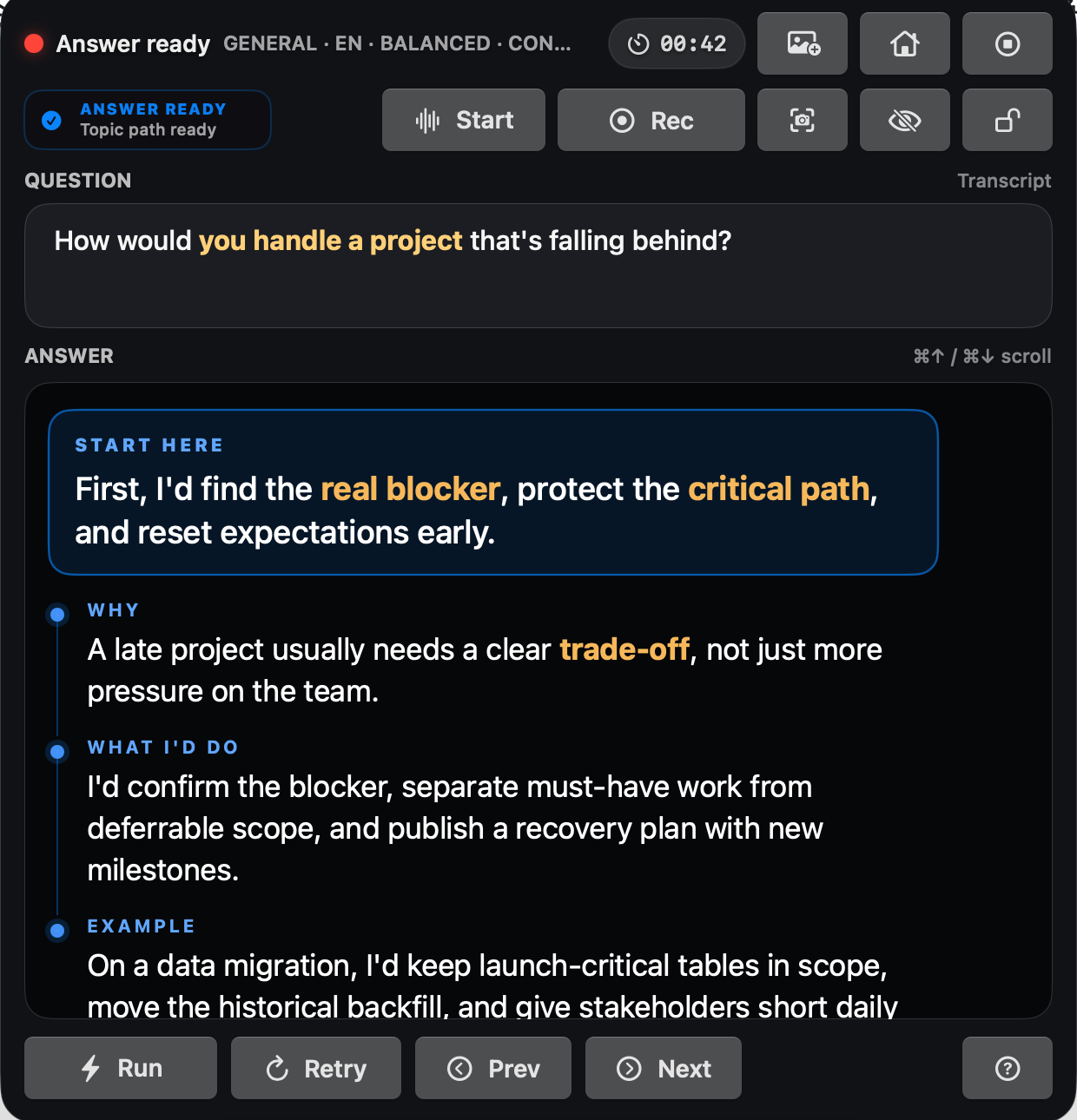
One answer, built to be spoken.
Start with the direct sentence. Use the topic path underneath only when the conversation asks for more.
You can begin with the direct answer while the supporting path is ready underneath it.
Each section gives you the next idea without turning the overlay into a script you have to recite.
The emphasis helps your eyes return to the important point after you look back at the other person.
From question to speaking in four steps.
The complete path is short, visible, and controlled from your Mac.
CueAside listens to the audio input you pick and detects when a real question has landed.
Checks your plan and monthly allowance, then passes the request through. There is no conversation-content table.1
Proxied server-side with store:false.2 Your account arrives as a hash, never as your email.3
One answer in the overlay. The session Q/A history is written to your Mac, not our database.4
Session history stays on your Mac. AI requests use storage disabled, while CueAside keeps only the account, billing, content-free usage, and bounded diagnostic records described below.
Your words are not the product.
The server record is limited to the categories below, with zero words from your conversations.
Server Ledger
What the CueAside servers hold
AI calls are proxied server-side with store:false. Operational metrics use pseudonymous account hashes and contain no conversation content. Abuse-prevention keys are hashes, not stored IP addresses. The private Console stores no conversation content in Production. Session history stays in the app on your Mac. Read the privacy policy →
Across your calls, in eleven languages.
CueAside listens from macOS, so it works without a meeting bot or a separate integration for every call app.
- Zoom · Google Meet · Microsoft Teams · Webex · Slack
- Phone calls, in-person conversations, anything audible
- No meeting bot, no calendar access, no OAuth grants
- Nothing installed inside the call app
Tune speed, language, and context.
Choose how quickly CueAside answers and what preparation it should use before the conversation begins.
Resume, project stories, meeting notes, the role you’re interviewing for. Context can be switched off entirely for a conversation where you don’t want it used.
Eleven options, each with its own speaking style. Standard technical terms are kept precise rather than translated into something that sounds odd out loud.
Four settings, from an instant opening line to a slower answer that surfaces the tradeoff you’re about to be asked about.
Each session keeps its questions and answers so you can review them afterwards. They are files on your machine, not rows in our database.
Questions before you try it.
The practical answers about calls, privacy, consent, and access.
Is this cheating?
It’s presenter notes. CueAside surfaces the preparation you gave it — your own experience, your own material — at the moment you need it, and you decide what to say. It cannot make you someone who knows the answer, and interviews have follow-up questions. Rules differ by employer, school and interviewer, so check the policy that applies to your conversation.
Does it join my call?
Never. It listens to the audio input you choose on your Mac. There is no bot in the participant list, no calendar access, and nothing to install inside Zoom, Meet, Teams, Webex or Slack.
What do your servers keep?
Account and optional profile data, subscription state, monthly usage counters, short-lived retry receipts, and content-free diagnostics. Not your audio, transcripts, questions, answers, resume, notes or context. The ledger in clause 03 summarizes the categories, and the Privacy Policy explains each retention boundary.
What about recording consent?
Rules vary by region and some require every participant to agree. CueAside listens to your Mac’s audio input, which makes you responsible for knowing the rules that apply to your conversations. We publish guidance rather than pretending the question doesn’t exist.
Which languages does it answer in?
English, Chinese, Spanish, French, German, Japanese, Korean, Portuguese, Italian, Hindi and Arabic — each with its own speaking style, with standard technical terms kept precise.
What does it need to run?
A Mac on macOS 15.3 or later. It is a native app — no Windows version, no web version of the overlay. Microphone permission is used for microphone input and My Replies; Screen Recording is required for System Audio and user-invoked Scan or Attach; Accessibility powers the global shortcuts.
When can I get it, and what will it cost?
CueAside is not publicly downloadable yet. Join the list and you’ll get the signed, notarized macOS release link and its price before anyone is charged. Checkout will open inside the app through Stripe.
Speak clearly before the moment moves on.
Leave an email and you’ll get the signed macOS release link and the price before anyone is charged. The waitlist stores that address and its signup source, and you can have the entry deleted by asking.